Floating Toolbar
The floating toolbar is a multi-functional feature that users can move around their screen by clicking and dragging on the handlebars (six dots). It is accessible on any module’s page in Docwize. Access to functions available in the Floating Toolbar are managed in the Admin Console.
What you can do in the Floating Toolbar
- Access toolbar functions from any Docwize module page
- Open notifications and pinned items
- Access Buckets and Docwize AI chat
- Use shortcuts managed through the floating toolbar
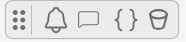
Floating Toolbar
Floating Toolbar icons
| Field | Description |
|---|---|
 | Accesses notifications. |
 | Accesses the Docwize AI Docwize AI chat function. |
 | Accesses Jinja code shortcuts. |
 | Accesses Buckets, where users create buckets to collect, store and share documents with others. |
| (Varies) | Accesses items (dataviews, buckets, records, etc.) that have been pinned to the floating toolbar for convenient access. |