Pinning Feature
Docwize allows users to pin folders to the Floating Toolbar for quick access to folders they use frequently.
What you can do with pinning
- Pin a folder to the floating toolbar
- Access a frequently used folder more quickly
- Remove a pinned folder from the toolbar
Pinning a folder
Right-click a folder name and select Toggle shortcut. The folder appears as an icon in the floating toolbar.
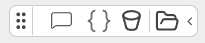
A pinned folder in the Floating Toolbar
Clicking a pinned folder's icon opens that folder.
Removing a pinned folder
Right-click the folder's name again in the folder tree and select Toggle shortcut to remove it from the floating toolbar.