Signing In
To access Docwize, go to portal.docwize.com. This page explains how to sign in, how to register if you don't have an account yet, what to do if you have forgotten your password, and which browsers Docwize supports.

What you can do from the sign-in page
- Sign in with your Docwize email address and password
- Sign in with an existing Google or Microsoft account
- Sign in with SSO, if your organisation has an identity provider connection configured
- Reset a forgotten password
- Register a new account
- Check which browsers Docwize supports, and what to do if yours is not supported
The sign-in page
The sign-in page is shown in your browser's language when Docwize supports it, so a browser set to Japanese shows it in Japanese.
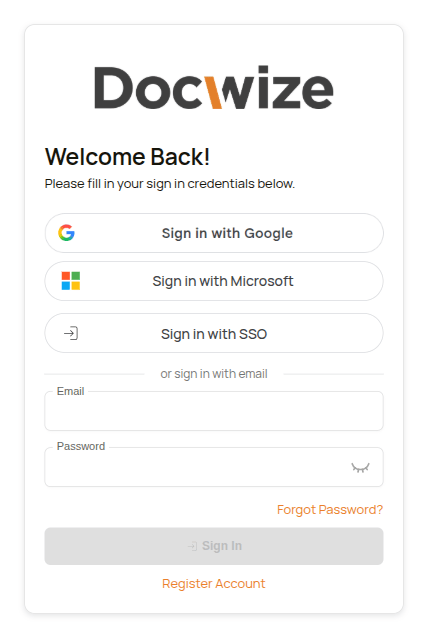
Docwize sign-in page
You can sign in with either:
- your Docwize email address and password
- an existing Microsoft account
- an existing Google account
- Sign in with SSO, a separate enterprise single sign-on option for organisations with an identity provider connection
Sign In becomes available once you have entered your email address and password. If you sign in with a password, you'll also be asked to complete a Verify you are human check before you can continue. This doesn't appear when signing in via Google, Microsoft, or SSO.
If two-factor authentication is turned on for your account, you'll be asked for the 6-digit code from your authenticator app each time you sign in. You can turn it on in your Settings.
If you belong to more than one organisation, you'll be asked to select the company you want to work in. You can switch to another one later from the sidebar.
Signing in with SSO
If your organisation signs in through its own identity provider, select Sign in with SSO. The other sign-in options are hidden, and you are asked for your work email address so that Docwize can take you to your organisation's sign-in. If you chose SSO by mistake, select Back to all sign-in options.
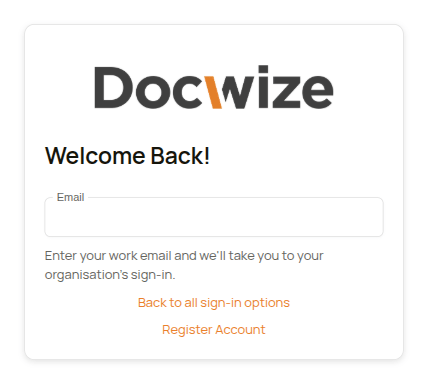
Signing in with SSO
Once you've signed in with SSO, the sign-in page remembers your email address. The next time you visit, the Email field is pre-filled and a Continue with [organisation's identity provider] link appears right away, skipping the extra step of clicking Sign in with SSO first.
Registering an account
If you don't already have a Docwize account, select Register Account on the sign-in page.
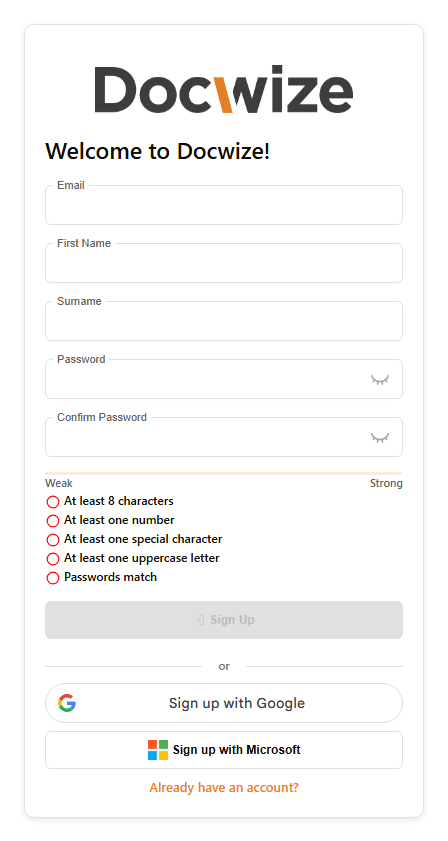
Docwize registration page
You can register with your email address, name and a password, or sign up with an existing Google or Microsoft account instead. As you type a password, a strength meter and a checklist show how strong it is: at least 8 characters, at least one number, at least one special character and at least one uppercase letter, and whether the two passwords match.
Sign Up becomes available once every field is filled in and the Verify you are human check is complete. After you select Sign Up, Docwize sends a verification code to your email address. Enter it on the Email Verification screen to finish registering.
If you already have an account, select Already have an account? to go back to the sign-in page.
Resetting a forgotten password
If you can't remember your password, select Forgot Password? on the sign-in page. Enter your email address on the Reset Password page and select Send Verification Code. Docwize emails you a code, which you enter together with your new password.
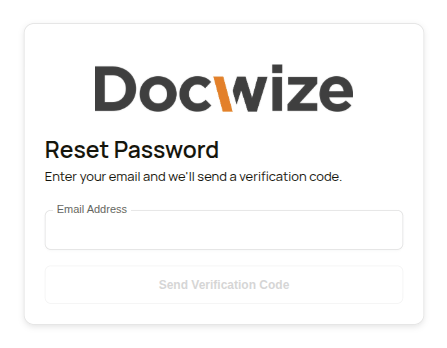
Reset Password page
Supported browsers
Docwize checks your browser before it shows the sign-in page, and only opens in browsers that still receive security updates. An old browser has publicly known weaknesses that can expose your sign-in and the documents you open. If your browser is supported, you go straight to the sign-in page. If it is not, Docwize shows an explanation instead, and you can sign in once you have updated the browser or switched to another one.
Docwize supports current versions of Google Chrome, Microsoft Edge, Firefox and Safari. A version stays supported for a limited time after it is released:
| Browser | A version is supported |
|---|---|
| Google Chrome, Microsoft Edge and other browsers built on Chromium | For about 13 months (400 days) after its release. Chrome and Edge update themselves, so a browser that is kept up to date is always inside this. |
| Firefox | For about 13 months after its release. A Firefox Extended Support Release (ESR) stays supported until 90 days after Mozilla ends support for that ESR. |
| Safari | The latest version, the version before it, and the one before that for six months after the latest version is released. |
| Browsers on an iPhone or iPad | Every browser on an iPhone or iPad uses the same engine as Safari, so Docwize also checks the iOS version, using the Safari rule above. A current Chrome on an iOS version that is no longer supported is not supported either. |
| Internet Explorer and Microsoft Edge Legacy | Not supported, whatever the version. |
When your browser is not supported
Docwize shows Update your browser to continue. The page is written in your browser's language when Docwize supports it, and in English otherwise.
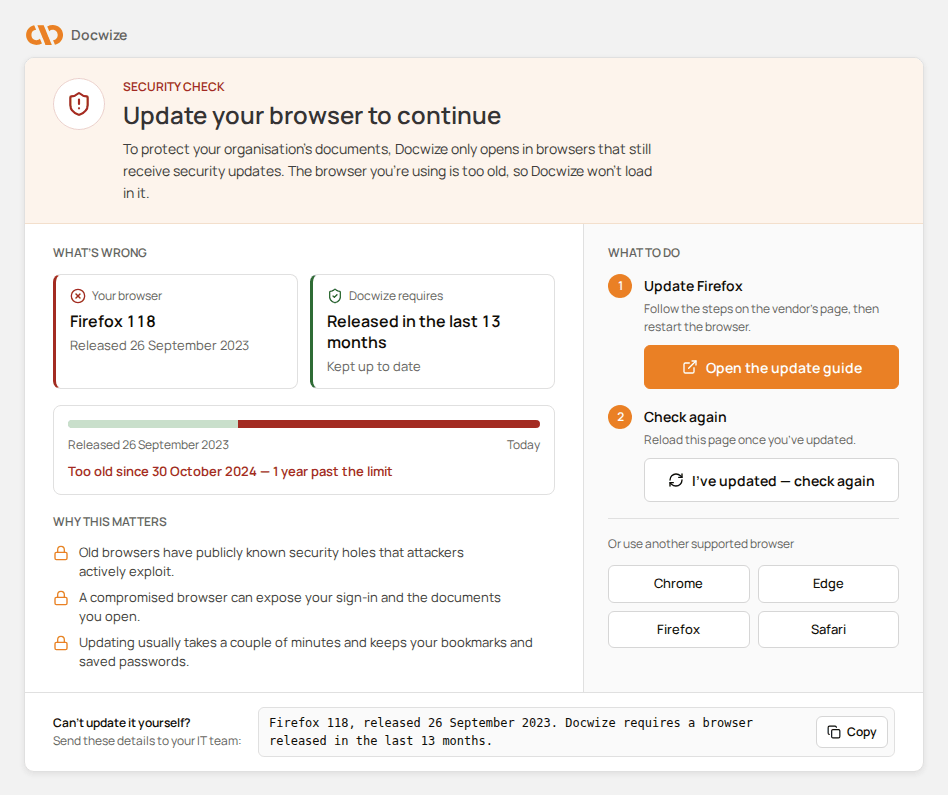
The page Docwize shows for a browser version that is no longer supported
The page has these parts:
| Part | What it shows |
|---|---|
| What's wrong | Your browser with its name, version and release date, next to what Docwize requires. A timeline shows when your version was released, today, and the date it stopped being supported. Why this matters explains why Docwize only opens in browsers that still receive security updates. |
| What to do | Step 1 is Update and your browser's name (for example Update Firefox), with Open the update guide to open the browser maker's own instructions. Step 2 is Check again: after updating, select I've updated — check again to reload the page. Or use another supported browser links to Chrome, Edge, Firefox and Safari. |
| Can't update it yourself? | The details to send to your IT team: the browser, its version and release date, and what Docwize requires. Select Copy to copy them. |
Microsoft no longer updates Internet Explorer or Microsoft Edge Legacy. For these, the page shows No longer receives security updates instead of a release date, and Switch to a supported browser with Get Microsoft Edge instead of an update guide.
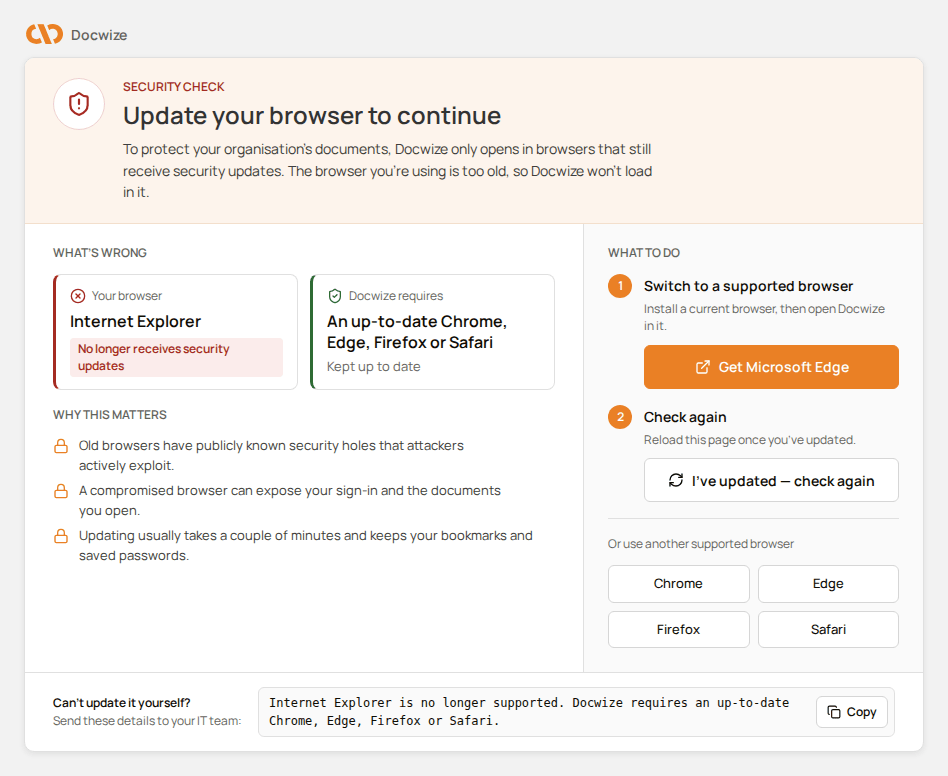
The page Docwize shows for Internet Explorer
How to sign in
| Step | Description |
|---|---|
| 1 | Open the Docwize sign-in page in a supported browser. |
| 2 | Enter your email address and password, or choose Sign in with Google, Sign in with Microsoft, or Sign in with SSO. |
| 3 | If you signed in with a password, complete the Verify you are human check and select Sign In. |
| 4 | When prompted, select the correct company. |
| 5 | Continue to the Homepage. |
If you have trouble signing in via Microsoft, see the related guidance in the FAQ.
How to register an account
| Step | Description |
|---|---|
| 1 | Open the Docwize sign-in page and select Register Account. |
| 2 | Enter your email, first name, surname and a password, and confirm the password — or choose Sign up with Google or Sign up with Microsoft instead. |
| 3 | Complete the Verify you are human check. |
| 4 | Select Sign Up. |
| 5 | Enter the verification code sent to your email address. |
How to update a browser that Docwize does not support
| Step | Description |
|---|---|
| 1 | On the Update your browser to continue page, select Open the update guide. If your browser is Internet Explorer or Microsoft Edge Legacy, select Get Microsoft Edge instead. |
| 2 | Follow the steps on the browser maker's page, then restart the browser. |
| 3 | Open Docwize again, or select I've updated — check again on the page. |
| 4 | If you cannot update the browser yourself, select Copy under Can't update it yourself? and send the details to your IT team. |