Reference Number Template
Users can configure a template for generating unique reference numbers. A reference number template combines static text and dynamic fields that pull from a document's metadata — such as doc type, WBS, or discipline — together with an auto-incrementing sequential iterator that ensures no two documents share the same reference number.
A reference number template can be created as a standalone, reusable, named template via New > New Reference Number, or written directly into a record's Reference Number Generation section. The Jinja syntax used to build them is accessible via the floating toolbar.
Who configures this
Users with access to the New module. Reusable templates are managed from New > New Reference Number; templates used within a record are configured from New > Custom Fields & Configuration > Manage Records.
Creating a reusable reference number template
New > New Reference Number opens the Generate New Reference Number dialog, which manages a list of named, reusable reference number templates independently of any single record.
| Control | Description |
|---|---|
| Template | Dropdown listing saved reference number templates. |
| Add | Opens the Add Jinja Template dialog to create a new template. |
| Edit | Opens the selected template in the Add Jinja Template dialog for editing. Disabled until a template is selected. |
| Delete | Removes the selected template. Disabled until a template is selected. |
Clicking Add (or Edit on an existing template) opens the Add Jinja Template dialog:
| Field | Description |
|---|---|
| Template Name | The name the template is saved and listed under. |
| Template String (Jinja) | The template string — static text, dynamic Jinja fields, and the $DW_SEQ_XXXXX$ sequential iterator, using the same syntax as the sample below. |
How to create a reusable reference number template
| Step | Description |
|---|---|
| 1 | Navigate to New > New Reference Number. |
| 2 | Click Add. |
| 3 | Enter a Template Name. |
| 4 | Enter the Template String (Jinja), combining static text, dynamic Jinja fields, and the $DW_SEQ_XXXXX$ iterator. |
| 5 | Click Create. |
Sample reference number template
DRG-{{document.doc_type}}-{{locations[0].Code}}-STATIC-$DW_SEQ_XXXX$
| Field | Description |
|---|---|
DRG | Static value — appears unchanged on all generated reference numbers. |
{{document.doc_type}} | Dynamic field — replaced with the document's doc type at generation time. |
{{locations[0].Code}} | Dynamic field — replaced with the first location's code. |
STATIC | Static value — appears unchanged on all generated reference numbers. |
$DW_SEQ_XXXX$ | Sequential iterator — generates a unique number for each document. The number of X characters sets the zero-padding width: XXXX produces 0001, XXX produces 001. |
Record Editor
A reference number field is added to a record template via a Reference Number section in the Record Editor (accessible from New > Custom Fields & Configuration > Manage Records).
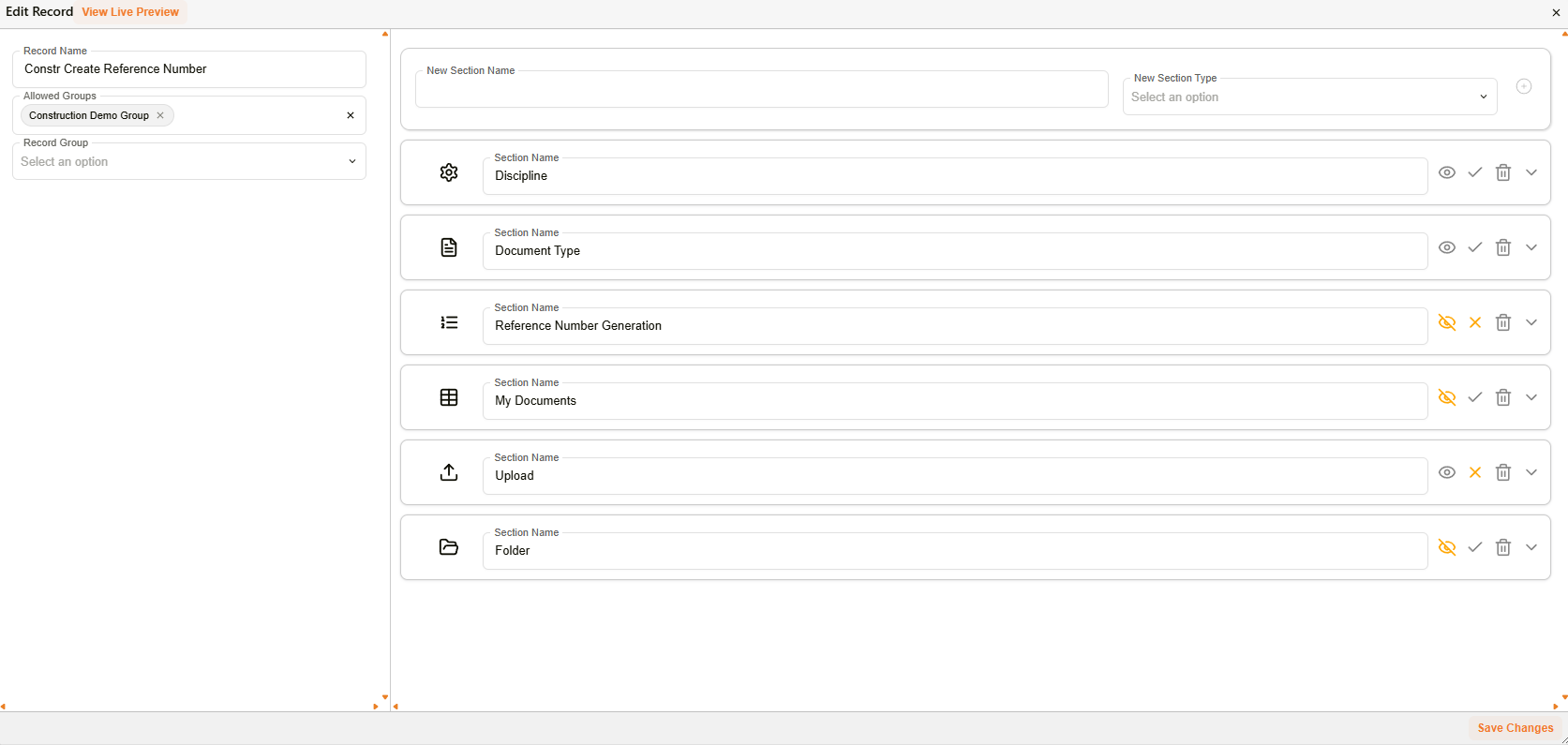
Edit Record — a Reference Number section alongside a record's other sections
| Field | Description |
|---|---|
| Record Name | The name of the record template. |
| Allowed Groups | Restricts which groups can use this record template. |
| Record Group | Groups this record template with related templates for organisation. |
| New Section Name | The name for a new section within the record (e.g. "Reference Number Generation"). |
| New Section Type | The type of the new section. Select Reference Number to add a reference number field. |
| View Live Preview | Renders a live preview of the record template as currently configured. |
| Save Changes | Saves the record template. |
Expanding a Reference Number section reveals two ways to supply the template — pick a saved one, or write it directly:
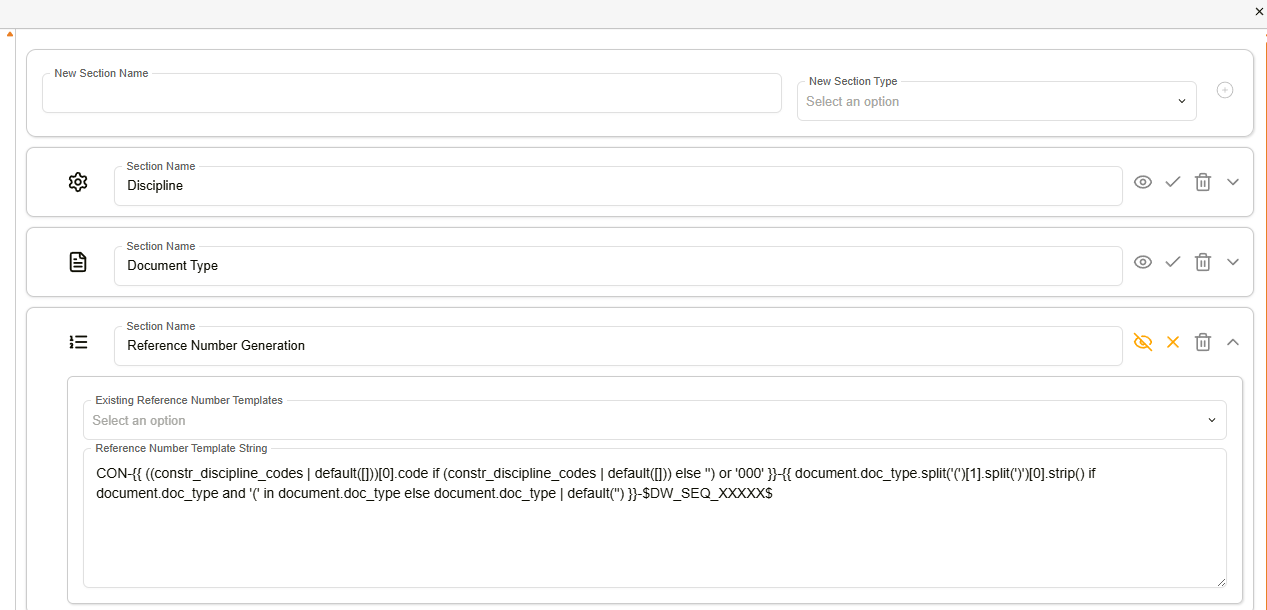
Reference Number Generation section — expanded
| Field | Description |
|---|---|
| Existing Reference Number Templates | Selects a template created via New > New Reference Number. |
| Reference Number Template String | The template string — static text, dynamic Jinja fields, and the $DW_SEQ_XXXX$ iterator — written directly for this record, whether or not an existing template is also selected above. |
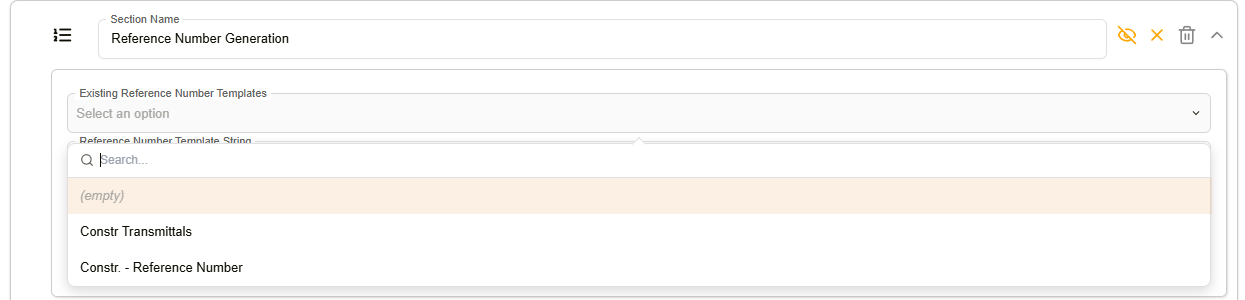
Existing Reference Number Templates — dropdown open
How to add reference number generation to a record
| Step | Description |
|---|---|
| 1 | Navigate to New > Custom Fields & Configuration > Manage Records. |
| 2 | Click Create New Record (or the pencil icon on an existing record). Enter a record name and configure Allowed Groups and Record Group as needed. |
| 3 | Add any metadata fields that will be used as dynamic values in the reference number (e.g. doc type, WBS, discipline). |
| 4 | In New Section Name, enter a name for the reference number field (e.g. "Reference Number Generation"). Under New Section Type, select Reference Number. Click Add to insert the section. |
| 5 | Expand the section's options. Either select a saved template from Existing Reference Number Templates, or enter a template directly in Reference Number Template String, combining static text, dynamic Jinja fields, and the $DW_SEQ_XXXX$ iterator. Include a dash (-) between elements. |
| 6 | Click Save Changes. |
How to generate a reference number
| Step | Description |
|---|---|
| 1 | Navigate to New and select the relevant record template. |
| 2 | Complete the required metadata fields in the record. |
| 3 | Click Save. The confirmation dialog displays the generated reference number, which can be copied, downloaded, or used to navigate to the document's details. |
Troubleshooting
| Issue | Detail |
|---|---|
| Reference numbers not unique | Confirm the $DW_SEQ_XXXX$ iterator is included in the template string. Without it, documents may receive identical reference numbers. |
| Dynamic field returns blank | The metadata field referenced in the template (e.g. {{document.doc_type}}) may not be populated on the document. Ensure the required fields are completed before generating. |
| Template string not saving | Check that the Reference Number section type has been selected and the section added before entering the template string. |
| Wrong zero-padding on sequential number | Adjust the number of X characters in $DW_SEQ_XXXX$ to change padding width. |
| Existing Reference Number Templates dropdown is empty | No reusable templates have been created yet. Create one via New > New Reference Number first. |
Related configuration
- Custom Fields — custom field templates used as dynamic sources for reference number fields
- Floating toolbar — Jinja syntax reference for building template strings