Attachments
The Attachments section is used to link supporting files to a main document while keeping the main document unchanged. Attachments are helpful for related material such as backup information, appendices, or correspondence that should stay associated with the document, but should not replace the primary file or create a new document revision.
Each attachment is a Docwize document of its own, with its own number and details, so you can open it, find it and file it like any other document. It stays linked to the main document, and you can always see the whole group together.
What you can do in Attachments
- Link supporting files to a main document
- Add several attachments in one go
- See a document together with all its attachments, from Explorer or from Document Details
- Open the details of any attachment
- See how the attachments relate to the main document in Lineage View
Attachments register
The register is where you see a main document and all its attachments together. Use it when you want to check what is attached to a document, or to add something new.
To open it, right-click a document in Explorer and select Attachments. The register lists the main document first, followed by every attachment. The row of the document you opened it from is shaded, so you can see where you started. If you open the register from one of the attachments, you see the same group, with that attachment's row shaded instead.
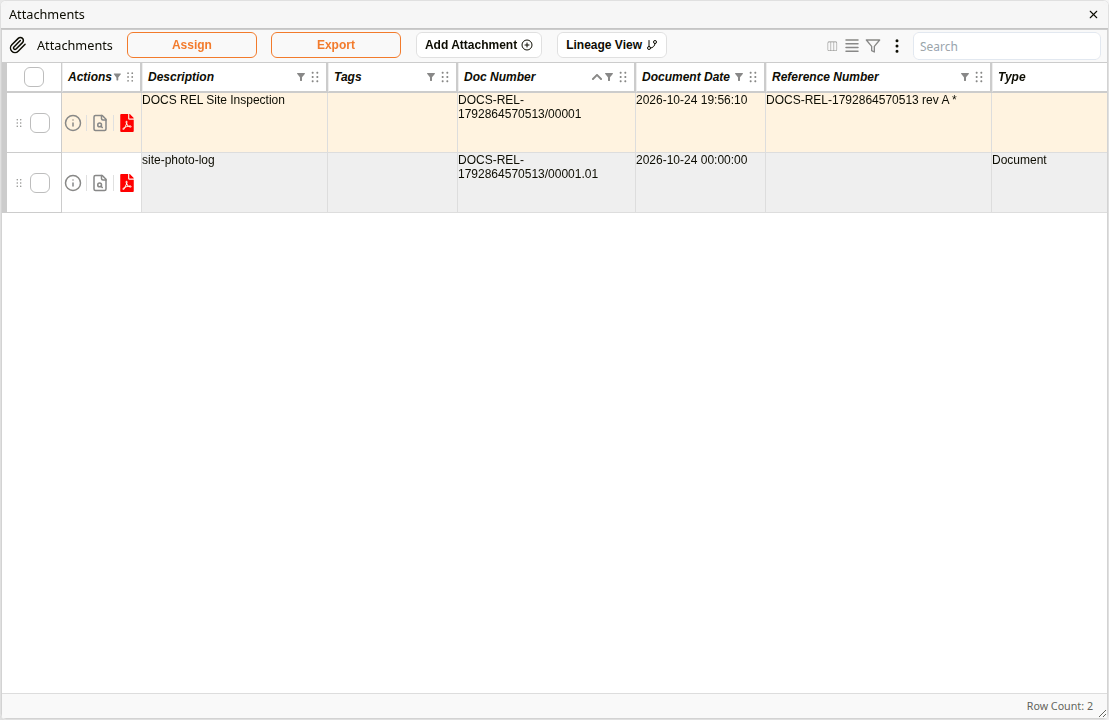
Attachments register
| Field | Description |
|---|---|
| Add Attachment | Adds one or more files as attachments of the document. |
| Lineage View | Shows the main document and its attachments as a diagram. |
| View Document Info (i icon) | Opens the Document Details of that row's document. |
| Doc Number | Each attachment is numbered after the main document, with .01, .02 and so on added in the order they were attached. For example, the first attachment of document 00001 is 00001.01. |
| Reference Number | The main document's reference number and revision. An attachment does not take the main document's reference number or revision, so it never appears in the main document's Revisions. |
The same register is in the document's Document Details, under Attachments. This is handy when you are already looking at a document's details and want to see what is attached to it.

Attachments in Document Details
Lineage View
Lineage View gives you a picture of the group instead of a list. It is useful when a document has many attachments and you want to see at a glance what belongs to it.
Click Lineage View in the register. The main document is shown on the left and its attachments to its right. The document you opened the register from is highlighted, as the Opened from key at the top shows. To go back to the list, click Grid View.
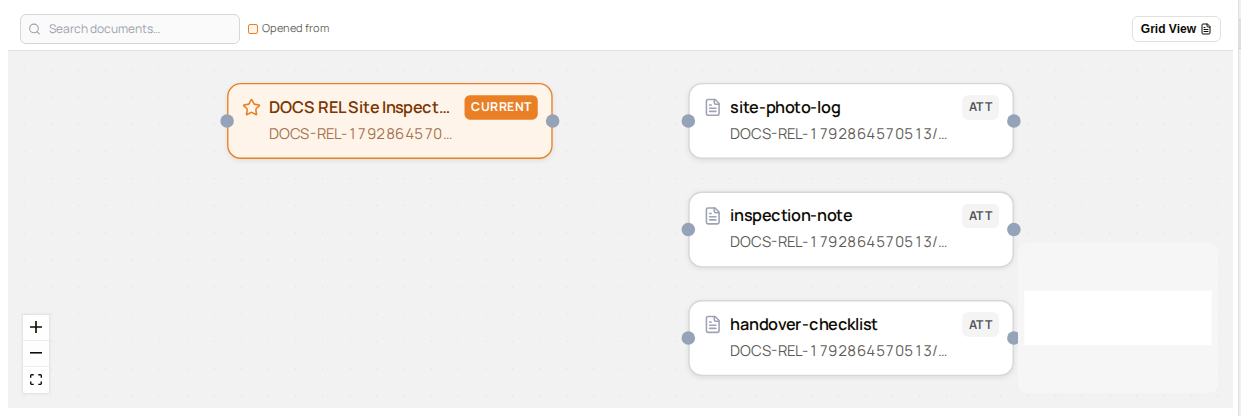
Lineage View
How to add an attachment
Add an attachment when you have a supporting file, such as a photo log or a checklist, that belongs with a document but is not a new version of it. You can choose several files at once, and each one becomes its own attachment.
Each attachment needs at least one folder, because document permissions are folder-based.
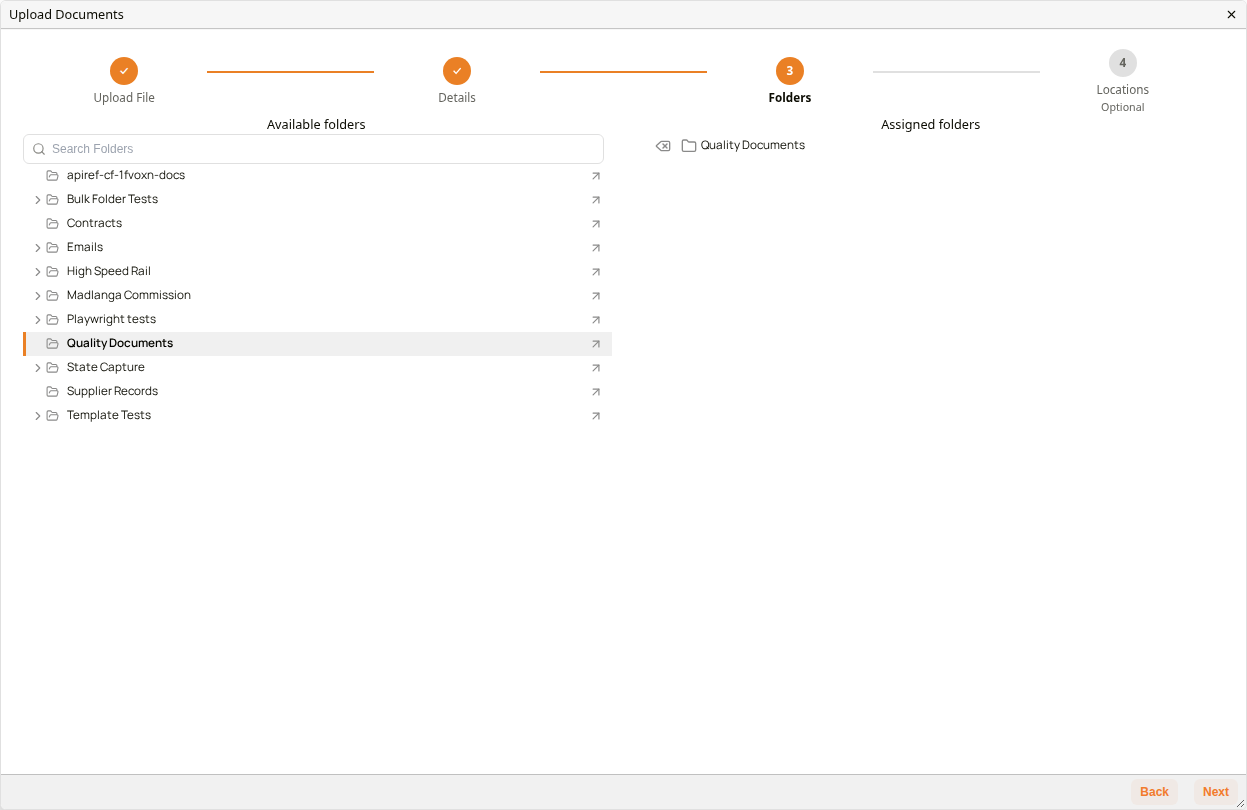
Folders step of the 'Upload Documents' window
| Step | Description |
|---|---|
| 1 | Right-click the document in Explorer and select Attachments. Alternatively, open the document's Document Details and go to Attachments. |
| 2 | Click Add Attachment. |
| 3 | Select one or more files from your device. The Upload Documents window opens on the Upload File step, with a card for each file. |
| 4 | On each card, check the Document Type. It starts as Document. Click Next. |
| 5 | On the Details step, check the details and click Next. The details apply to every file you chose. Document Date starts on the parent document's date, or on today's date if the parent has none. It is required: if you clear it, the field shows Document Date is required and Next is unavailable until you enter a date. |
| 6 | On the Folders step, click a folder under Available folders. It appears under Assigned folders. Next stays unavailable until at least one folder is assigned. Click Next. |
| 7 | The Locations step is optional. Click Finish. |
| 8 | Wait until each file shows that its upload is complete, then close the Upload Documents window. The new attachments appear in the register. |
Example: Adding an Attachment