Explorer
The Explorer module allows users to access and navigate through their documents in a variety of ways. Users can navigate between the options using the horizontal toolbar.
Ways to explore documents
Explorer provides multiple ways to access documents, depending on how the documents are organised and how users want to work with them.
Explorer views
The following views are available from the Explorer toolbar:
- Folders
- Locations
- Dataviews
- Virtual folders
- Tags
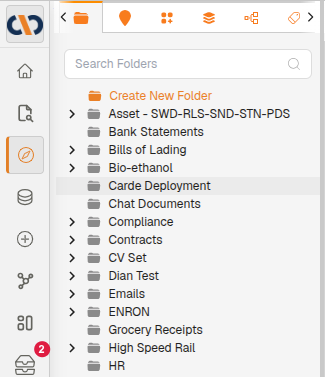
Example: Explorer Open on Folder View
| Field | Description |
|---|---|
 | The traditional folder structure can be created according to users' preferences. |
 | Accessing documents via locations benefits industries such as mining companies, where documents are linked to specific places. |
 | Dataviews are customizable views that can include multiple fields of information pertaining to the documents. Virtual interfaces are also accessed here. |
 | Whereas the ‘traditional’ folder structure more closely resembles boxes with papers placed into them, the virtual folder structure resembles papers placed on the sticky strings of a spiderweb. Depending on which string users ‘pull on', they can access the same document via a different avenue. |
 | Tags function like colorful ‘sticky notes’ that someone might add to identify documents related to the similar topic and/or that contain the same key phrases, format or content. Accessing documents via Tags allows users to view the various bundles of tagged, or allocated, documents. |