Billing
The Billing page provides authorised users with a real-time view of the organisation's usage and estimated costs for the current billing period. It is accessible from the Admin Console left-hand navigation, and also from the menu that appears when a user clicks their login icon.
Who configures this
Users with access to the Admin Console. The Billing page is accessible from Admin Console > Billing, or from the login menu in the top-right corner of the portal.
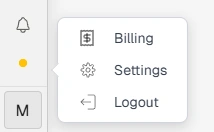
Billing option in the login menu
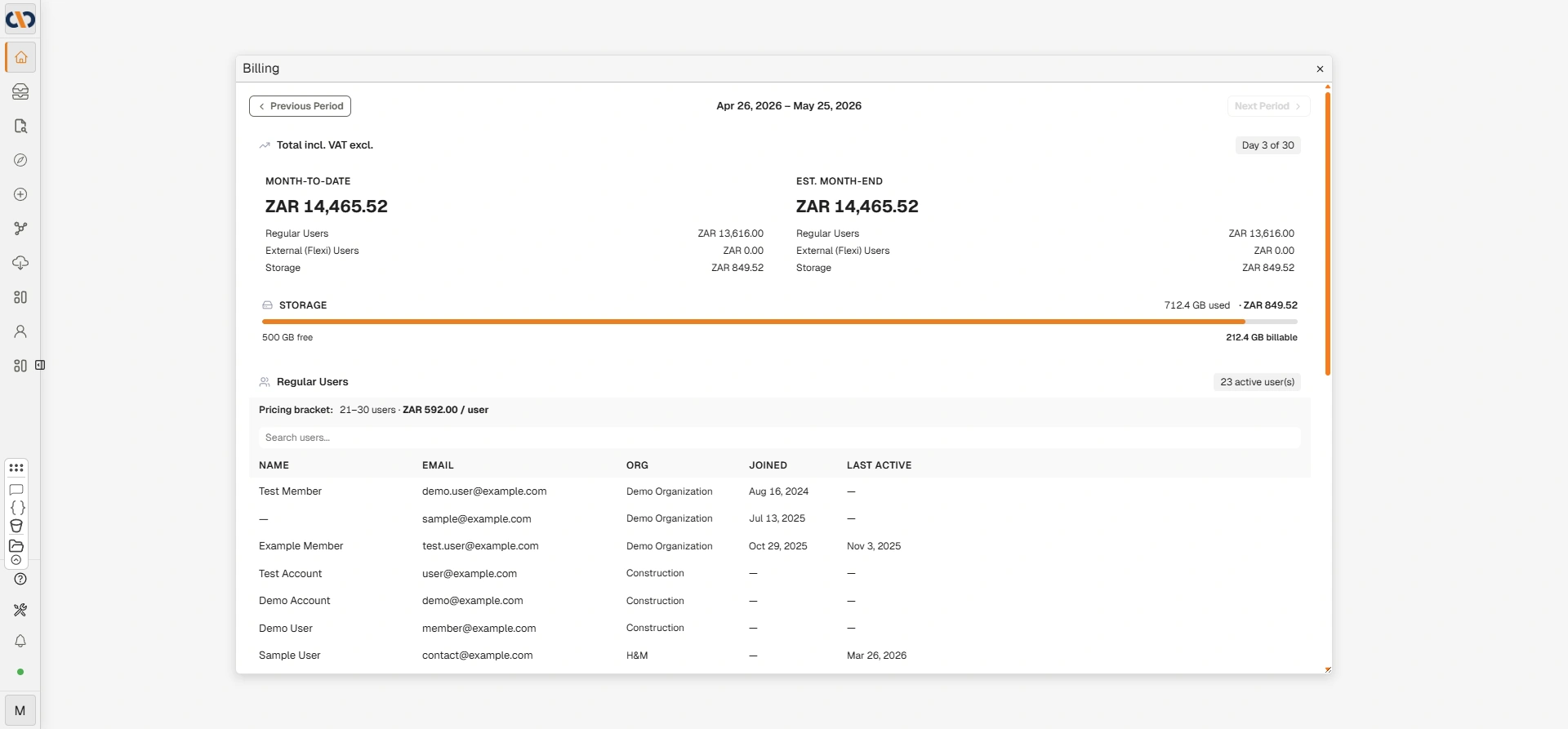
Billing page
Billing period navigation
| Field | Description |
|---|---|
| Previous Period | Navigates to the previous billing period to review historical usage and costs. |
| Current period dates | Displays the start and end dates of the currently selected billing period. |
| Next Period | Navigates to the next billing period. Greyed out when the current period is selected. |
| Day X of Y | Indicates how far through the current billing period the organisation is. |
Total incl. VAT excl.
This section summarises the organisation's billing totals for the selected period, broken down by category.
| Field | Description |
|---|---|
| Month-to-Date | The accumulated total cost from the start of the billing period to the current date. |
| Est. Month-End | The projected total cost by the end of the billing period, based on current usage. |
| Regular Users | The cost attributed to regular (full-access) users. |
| External (Flexi) Users | The cost attributed to external or flexible-access users. |
| Service Costs | The cost attributed to AI and processing services consumed during the period (e.g. LLM tokens, OCR). |
| Storage | The cost attributed to storage usage above any included allowance. |
Storage
| Field | Description |
|---|---|
| Progress bar | Visually indicates the proportion of total storage allocation currently in use. |
| GB used | The amount of storage currently consumed by the organisation. |
| GB free | The amount of storage remaining within the organisation's included allocation. |
| GB billable | The amount of storage that exceeds the included free allocation and is subject to additional charges. Only shown when usage exceeds the free allowance. |
Regular Users
This section lists all regular users who have been active during the billing period and are contributing to the billing count.
| Field | Description |
|---|---|
| Active user(s) | The total number of regular users active in the current billing period. |
| Pricing bracket | The applicable pricing tier based on the active user count, showing the user range and cost per user. |
| Search users | Searches the list of active users by name or email address. |
| Name | The full name of the active user. |
| The email address of the active user. | |
| Org | The organisation the user belongs to. |
| Joined | The date the user was added to the system. |
| Last Active | The date the user last logged in. A dash (—) indicates the user has not logged in during the period. |
Service Costs
The Service Costs section lists consumption-based charges for AI and processing services used during the billing period.
| Field | Description |
|---|---|
| Service | The name of the billable service (e.g. LLM Tokens, OCR). |
| Quantity | The volume of the service consumed during the period (e.g. number of tokens, number of pages). |
| Rate | The unit price for the service. |
| Cost | The total cost for the service during the period. |
External (Flexi) Users
External (Flexi) Users are occasional external users billed per login day at 10% of the equivalent standard user licence rate, capped at the price of a full standard user licence. This access type is suited to users who only need access a few times per month.
This section lists external (Flexi) users active during the billing period, if applicable.

External (Flexi) Users section
| Field | Description |
|---|---|
| External user(s) | The total number of external users active in the current billing period. |
| Search users | Searches the list of external users by name or email address. |
| User | The name or email address of the external user. |
| Login Days | The number of days the user logged in during the billing period. |
| Billing Fraction | The proportion of the billing period the user is billed for, based on their login activity. |
Troubleshooting
| Risk | Detail |
|---|---|
| Billing page not visible in Admin Console | Access to the Billing page requires specific billing permissions. Contact the account owner or Docwize support if the page is not visible. |
| Active user count higher than expected | Any user who has logged in during the billing period is counted as active, regardless of how briefly. Review the user list in the Regular Users section to identify unexpected entries. |
| Est. Month-End figure seems high | The estimate is based on usage to date projected forward. Review Service Costs to identify any unexpectedly high AI or OCR consumption. |
Related configuration
- Admin Console — overview of all Admin Console areas
- Users — manage user accounts; active users contribute to the billing count