請求 (Billing)
**請求 (Billing)**ページでは、権限を持つユーザーに対して、現在の請求期間における組織の使用状況と見積もりコストのリアルタイムビューを提供します。このページは、管理コンソールの左側ナビゲーション、およびユーザーがログインアイコンをクリックしたときに表示されるメニューからアクセスできます。
アクセス権限について
**管理コンソール (Admin Console)**へのアクセス権を持つユーザーが対象です。請求ページは、管理コンソール > 請求から、またはポータルの右上隅にあるログインメニューからアクセスできます。
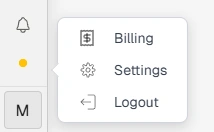
ログインメニュー内の請求オプション
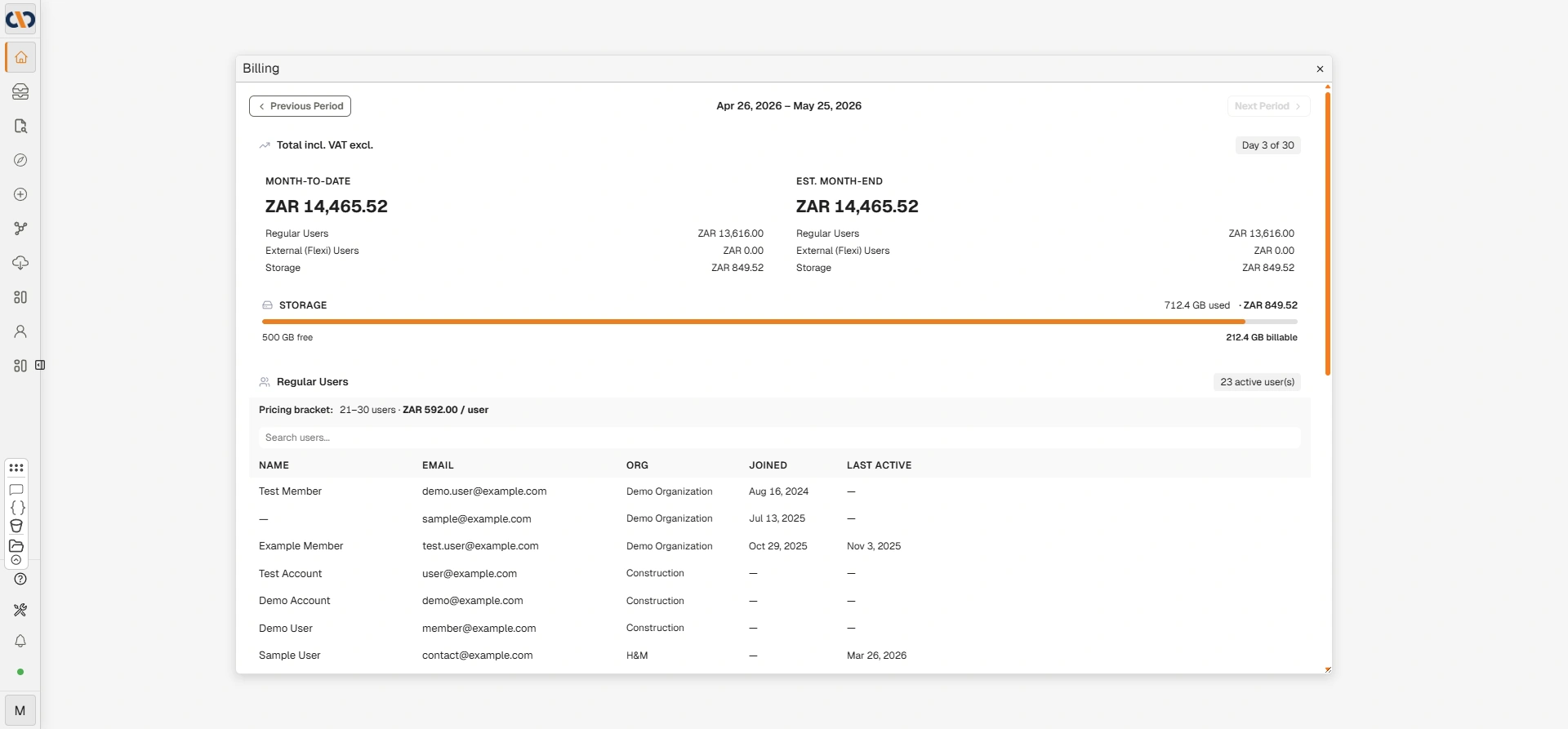
請求ページ
請求期間の切り替え
| フィールド | 説明 |
|---|---|
| 前の期間 (Previous Period) | 前の請求期間に移動して、過去の使用状況とコストを確認します。 |
| 現在の期間の日付 (Current period dates) | 現在選択されている請求期間の開始日と終了日を表示します。 |
| 次の期間 (Next Period) | 次の請求期間に移動します。現在の期間が選択されている場合はグレーアウトします。 |
| Y日中X日目 (Day X of Y) | 組織が現在の請求期間のどの段階にあるかを示します。 |
合計金額(税込・税抜)
このセクションでは、選択された期間における組織の請求合計の概要をカテゴリ別に表示します。
| フィールド | 説明 |
|---|---|
| 今月累計 (Month-to-Date) | 請求期間の開始から現在の日付までの累積合計コスト。 |
| 月末見積もり (Est. Month-End) | 現在の使用状況に基づいて予測された、請求期間終了時の予測合計コスト。 |
| 一般ユーザー (Regular Users) | 一般ユーザー(フルアクセス権限)に起因するコスト。 |
| 外部(Flexi)ユーザー (External (Flexi) Users) | 外部またはフレキシブルアクセスのユーザーに起因するコスト。 |
| サービスコスト (Service Costs) | 期間中に消費されたAIおよび処理サービス(例:LLMトークン、OCR)に起因するコスト。 |
| ストレージ (Storage) | 含まれている無料枠を超えるストレージ使用量に起因するコスト。 |
ストレージ
| フィールド | 説明 |
|---|---|
| 進捗バー | 現在使用されている合計ストレージ割り当ての割合を視覚的に示します。 |
| 使用済みGB (GB used) | 組織によって現在消費されているストレージの量。 |
| 残りGB (GB free) | 組織に含まれる割り当て内で残っているストレージの量。 |
| 課金対象GB (GB billable) | 含まれている無料枠を超え、追加料金の対象となるストレージの量。使用量が無料枠を超えた場合にのみ表示されます。 |
一般ユーザー
このセクションでは、請求期間中にアクティブであり、請求カウントの対象となっているすべての一般ユーザーを一覧表示します。
| フィールド | 説明 |
|---|---|
| アクティブユーザー数 (Active user(s)) | 現在の請求期間中にアクティブな一般ユーザーの総数。 |
| 料金ブラケット (Pricing bracket) | アクティブユーザー数に基づいた適用料金枠。ユーザー範囲とユーザーあたりのコストが表示されます。 |
| ユーザーの検索 (Search users) | 名前またはメールアドレスでアクティブユーザーの一覧を検索します。 |
| 名前 (Name) | アクティブユーザーのフルネーム。 |
| メールアドレス (Email) | アクティブユーザーのメールアドレス。 |
| 組織 (Org) | ユーザーが所属する組織。 |
| 参加日 (Joined) | ユーザーがシステムに追加された日付。 |
| 最終アクティブ日 (Last Active) | ユーザーが最後にログインした日付。ダッシュ(—)は、期間中にユーザーがログインしていないことを示します。 |
サービスコスト
サービスコスト(Service Costs)セクションには、請求期間中に使用されたAIおよび処理サービスの従量制料金が一覧表示されます。
| フィールド | 説明 |
|---|---|
| サービス (Service) | 課金対象サービスの名前(例:LLMトークン、OCR)。 |
| 数量 (Quantity) | 期間中に消費されたサービスの量(例:トークン数、ページ数)。 |
| 単価 (Rate) | サービスの単価。 |
| コスト (Cost) | 期間中のサービスの総コスト。 |
外部(Flexi)ユーザー
外部(Flexi)ユーザーは、ログインした日数に応じて課金される不定期の外部ユーザーです。料金は一般ユーザーライセンスの10%で、最大でも一般ユーザー1ライセンス分の料金に上限設定されます。このアクセスタイプは、月に数回しかアクセスする必要がないユーザーに適しています。
このセクションでは、請求期間中にアクティブだった外部(Flexi)ユーザーを一覧表示します(該当する場合)。

外部(Flexi)ユーザーセクション
| フィールド | 説明 |
|---|---|
| 外部ユーザー数 (External user(s)) | 現在の請求期間中にアクティブな外部ユーザーの総数。 |
| ユーザーの検索 (Search users) | 名前またはメールアドレスで外部ユーザーの一覧を検索します。 |
| ユーザー (User) | 外部ユーザーの名前またはメールアドレス。 |
| ログイン日数 (Login Days) | 請求期間中にユーザーがログインした日数。 |
| 請求割合 (Billing Fraction) | ログインアクティビティに基づいて、ユーザーが課金される請求期間の割合。 |
トラブルシューティング
| リスク | 詳細 |
|---|---|
| 管理コンソールに請求ページが表示されない | 請求ページへのアクセスには、特定の請求権限が必要です。ページが表示されない場合は、アカウントの所有者またはDocwizeサポートにお問い合わせください。 |
| アクティブユーザー数が想定より多い | 請求期間中に一度でもログインしたユーザーは、どんなに短時間であってもアクティブとしてカウントされます。「一般ユーザー」セクションのユーザーリストを確認し、予期しないエントリーがないか特定してください。 |
| 月末見積もりが高すぎるように見える | 見積もりは、現在までの使用状況を将来に投影して算出されます。サービスコストを確認し、予期せず高いAIやOCRの消費がないか特定してください。 |
関連設定
- 管理コンソール (Admin Console) — 管理コンソールのすべての領域の概要
- ユーザー (Users) — ユーザーアカウントの管理。アクティブユーザーは請求カウントの対象になります